

Ergonomic Chairs and Desk Setup: What Actually Reduces Back and Neck Pain

Key Takeaways
- Laboratory studies consistently show a backrest set to about 100 to 110 degrees with lumbar support loads the spinal discs less than sitting bolt upright at 90 degrees.
- The 2018 Cochrane review found sit-stand desks reduce workplace sitting by roughly 100 minutes a day in the short term, but rated the evidence low-certainty and found little data on pain.
- The WHO's 2020 guidelines were the first to give adults a formal recommendation to limit sedentary time and replace it with activity of any intensity.
- An adult head weighs about 10 to 12 pounds, and biomechanical models estimate that tilting it 45 degrees toward a low screen multiplies the load on the neck several times.
- No randomized trial has tested the so-called ADHD chair as a treatment for attention-deficit hyperactivity disorder, and no clinical guideline includes active-sitting furniture.
- The Mayo Clinic advises standing, stretching or walking for a minute or two every 30 minutes, which is the single intervention with the most consistent link to less sitting-related discomfort.
An ergonomic chair reduces back and neck pain mainly by supporting the lower back's natural curve, keeping hips and knees roughly level, and letting you change position easily. Trials show the benefit is modest and depends on correct adjustment; the strongest evidence for less pain comes from combining a well-set chair with regular movement breaks, a monitor at eye level and daily exercise.
A wobbling stool, filmed from someone’s kitchen table, has gathered tens of millions of views this autumn under the label “the ADHD chair.” Scroll a little further and the same feeds fill with return-to-office grumbles, mesh-backed thrones and one question typed into search engines at record volume as of September 2026: does an ergonomic chair actually do anything for back and neck pain, or is it just furniture with a backstory?
Spine clinicians have fielded versions of that question since the first typing pool. The honest answer is more interesting than yes or no. The chair matters, but less than how it is adjusted, and far less than how often you get out of it. Some of the most expensive-looking seats are set up so badly that a dining chair and a rolled towel would serve the spine better.
What follows is the evidence, graded by strength, on chairs, desks, monitors, standing, wobbling and the humble act of standing up every half hour.
What does an ergonomic chair do?
The word ergonomic simply means designed to fit the dimensions and movements of a human body rather than forcing the body to fit the object. Applied to a chair, that promise comes down to adjustability. A chair earns the label when you can change its seat height, seat depth, backrest angle, lumbar support and armrest position until the chair meets you where you are, whether you are five feet tall or six foot four.
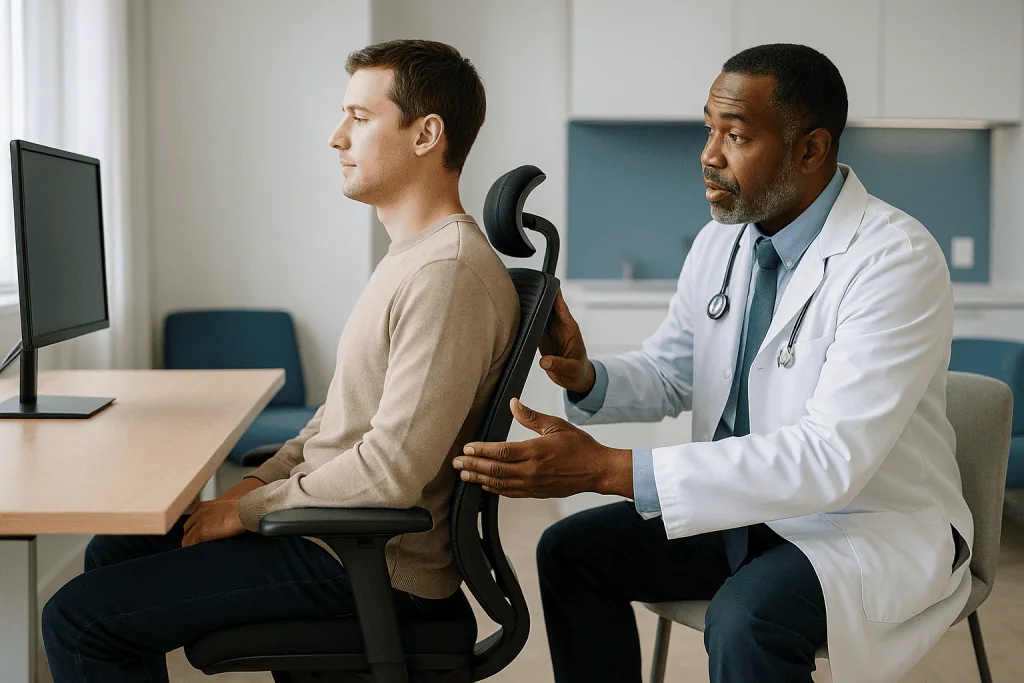
Why does that matter for pain? When you sit, the natural inward curve of the lower back, called the lumbar lordosis, tends to flatten. The pelvis rolls backward, the lower spine rounds, and the muscles and ligaments along it take a long, steady stretch they were not built to hold for hours. A chair with a backrest shaped to the lower back, and a seat that lets your feet rest flat, pushes gently against that collapse. The Mayo Clinic’s office ergonomics guide describes the target position plainly: knees about level with the hips, feet flat on the floor or a footrest, and a small gap between the back of the knees and the seat edge.
Equally important is what an ergonomic chair does not do. It does not strengthen the muscles that hold you up. It does not treat a herniated disc, a term for the soft cushion between two vertebrae bulging out of place. It does not undo eight hours of stillness. Think of it the way you might think of good running shoes: they reduce the penalty for a repeated activity, but they are not the activity, and they cannot substitute for the rest of your training.
Framed that way, a chair’s real job is to lower the baseline strain of sitting so that the harder lever, how long and how still you sit, has less damage to work with.
What changed recently
Nothing dramatic has arrived in the form of a new device approval or a landmark trial of chairs. What has shifted, steadily and then suddenly in public attention, is the frame around the question. Three dated developments explain most of it.
First, in November 2020 the World Health Organization published its guidelines on physical activity and sedentary behaviour, and for the first time gave adults a formal recommendation to limit sitting time and to replace it with activity of any intensity, alongside the familiar 150 to 300 minutes of moderate activity a week. That moved sedentary time from a lifestyle footnote to a guideline-level target, and it reframed furniture as part of a movement problem rather than a posture problem.
Second, the Cochrane Collaboration’s 2018 review of workplace interventions for reducing sitting, indexed on PubMed, remains the most rigorous summary of sit-stand desks. Its headline figure, roughly 100 fewer minutes of sitting per workday in the first months, is now quoted everywhere, though its careful caveat about low-certainty evidence and scarce pain data rarely travels with it.
Third, and most visible, is the 2026 social-media wave around “active sitting,” the broad name for stools, balls and wobble seats that keep the trunk muscles working. Clips tagged as the ADHD chair claim better focus, less fidgeting and a pain-free back from one purchase. None of those claims rests on a controlled trial of the product shown, and the sections below take them one by one.
Hybrid work has pushed all of this from the office facilities department to the family budget. People who once inherited an adjustable chair with a desk now choose, and misadjust, their own.
What the evidence actually says about ergonomic chairs and pain
Grading the evidence honestly means separating three different claims that usually get blended together.
Claim one: a supportive chair changes spinal posture in the moment. This is well established in laboratory measurement. Lumbar support and a slightly reclined backrest reduce rounding of the lower back and lower the activity of the muscles along the spine. Strength of evidence: consistent, but these are small mechanical studies, not pain outcomes.
Claim two: a supportive chair reduces back and neck pain over weeks and months. Here the picture thins. Randomized trials exist, but they are few, small, hard to blind and usually test a chair together with an ergonomics training session, so the chair’s own contribution cannot be isolated. Systematic reviews of workplace ergonomic programs generally find low-to-moderate-quality evidence of modest pain reduction, with the clearest effects when adjustment advice and movement breaks are part of the package. Strength of evidence: low to moderate, favoring a small benefit.
Claim three: a chair prevents back pain from starting. This is the weakest link. Low back pain is extraordinarily common, affects most adults at some point, and in the NHS’s words usually improves within a few weeks regardless of furniture. Prevention trials that rely on equipment alone have struggled to show an effect, while exercise programs have fared better. Strength of evidence: weak for chairs alone; moderate for exercise.
Set against all of this is one finding that holds up across study designs: people who break up sitting, and who meet physical-activity targets, report less musculoskeletal pain and face lower cardiometabolic risk. The Mayo Clinic summarizes pooled data showing that sitting more than eight hours a day with little activity carries risks in the same league as obesity, while 60 to 75 minutes of daily moderate activity offsets much of it.
So the evidence-first ranking is clear. Movement first, adjustment second, the chair itself third.
Why sitting still makes backs and necks ache
Discomfort after a long meeting is not a sign that something is broken. It is a predictable response to static load, which is the engineering term for a force applied to tissue continuously, without the rhythmic on-and-off that muscles and joints prefer.

Consider the neck. An adult head weighs roughly 10 to 12 pounds balanced on top of seven small vertebrae. Tilt it forward to read a laptop screen or a phone and the lever arm lengthens; biomechanical models estimate that at a 45-degree tilt the effective load on the neck muscles and discs climbs to several times the head’s resting weight. Those figures come from mathematical modelling rather than direct measurement, so treat the exact numbers loosely, but the direction is not in doubt. Forward head posture is the single most common feature clinicians see in desk-related neck pain.
Now the lower back. Classic pressure studies suggested that slumped, unsupported sitting raised pressure inside the lumbar discs well above the standing value. Later measurements found smaller differences, yet the pattern survived: slumped sitting loads the discs and the back ligaments more than upright sitting with support, and sitting of any kind loads them more than lying down.
Muscles complain sooner than discs do. Held in one position, the spinal stabilizers fatigue, blood flow through them drops, and the brain registers that fatigue as an ache. Hip flexors shorten with the hips bent at 90 degrees all day, and tight hip flexors pull the pelvis forward when you finally stand, a mechanism many people recognize as the stiff first few steps after a long drive.
None of these processes is dangerous in itself. They are the body’s request for a change of position. An ergonomic chair softens the request; getting up answers it.
Which ergonomic chair features actually matter?
Marketing lists can run to a dozen features. Clinically, a handful carry nearly all the value, and they are the adjustable ones. The table ranks them by how much they influence spinal load and how strong the supporting evidence is.
| Feature | What it does for the spine | Evidence strength | Priority |
|---|---|---|---|
| Seat height adjustment | Puts feet flat and knees level with hips, so the pelvis is not tipped | Strong mechanical, expert consensus | Essential |
| Adjustable lumbar support | Preserves the lower-back curve and reduces slumping | Consistent lab data, modest pain trials | Essential |
| Seat depth adjustment | Allows a two-finger gap behind the knees, protecting circulation | Expert consensus | High |
| Backrest recline with tension control | Shifts some trunk weight off the discs; enables position change | Mechanical studies favor 100–110 degrees | High |
| Height-adjustable armrests | Unloads the shoulders and upper trapezius muscles | Moderate, mainly neck and shoulder symptoms | High |
| Swivel base and casters | Encourages small movements, reduces twisting reach | Expert consensus | Medium |
| Headrest | Supports the neck only when reclined | Limited | Optional |
| Mesh versus foam | Comfort and temperature preference | No pain difference shown | Preference |
Two observations from that list deserve emphasis. Lumbar support only works if it sits at the right height, roughly level with the belt line; a fixed cushion that lands at the mid-back pushes the shoulders forward and can make neck pain worse. And armrests, often treated as a luxury, matter more for the neck than almost anything else on the chair, because unsupported arms hang their weight from the shoulder girdle all day.
Notice what is absent: price, brand and how executive the chair looks. The MedlinePlus posture guide and the Mayo Clinic checklist both describe positions, never products.
How to adjust an ergonomic chair in five minutes
A chair left on its factory settings is a chair fitted to nobody. Run through this sequence once, in order, because each step depends on the one before.
- Height first. Sit all the way back and raise or lower the seat until your thighs are roughly parallel to the floor and your feet rest flat. If the desk forces the seat higher than that, use a footrest or a sturdy box rather than dangling your feet.
- Depth second. Slide the seat pan until you can fit two or three fingers between the front edge and the back of your knees. A seat that is too long pulls you forward out of the backrest; too short and your thighs lose support.
- Lumbar third. Move the support up or down until it fills the curve just above the belt line. It should feel like a gentle nudge, not a fist in the back.
- Recline fourth. Set the backrest between upright and a slight lean, around 100 to 110 degrees, and loosen the tension enough that leaning back takes little effort. A locked-upright chair guarantees you will slump away from it.
- Arms last. Raise the armrests until your shoulders drop and relax with elbows bent near 90 degrees. If the armrests stop the chair from sliding under the desk, lower them or push them outward rather than giving up on them.
Then the test. Type for twenty minutes and notice where you have drifted. Most people slide forward on the seat, which means the recline tension is too stiff or the lumbar is too low. Fix the chair, not your willpower.
Repeat the sequence whenever anyone else sits in the chair or whenever you change shoes with a different heel height. Those small details move the whole geometry more than people expect.
Ergonomic desk setup: monitor height and the neck
If the chair is the foundation, the monitor is the steering wheel. Where the screen sits decides where the head goes, and the head decides what the neck has to carry. Most desk-related neck pain is a monitor problem wearing a chair costume.
The target is simple to state. Sit back in your adjusted chair, look straight ahead, and the top line of text on the screen should sit at or just below eye level, with the screen about an arm’s length away. That lets the eyes glance downward a few degrees, the position in which the neck muscles work least. Place the monitor directly in front of you; a screen angled off to one side is a recipe for one-sided neck and shoulder tightness.
Keyboard and mouse come next. They should be close enough that the elbows stay near the body with the forearms roughly parallel to the floor and the wrists straight rather than cocked upward. Reaching forward for a keyboard pulls the shoulders out of the backrest and begins the slump.
Desk height is the piece people cannot change, and it is often the real culprit. Standard desks are built for someone taller than average. If your forearms cannot rest level without hunching your shoulders, raise the chair to fit the desk and add a footrest, or lower the keyboard on a tray. Choose the fix that keeps the shoulders down.
Two monitors? Put the one you use most straight ahead and the second angled beside it, or center the pair if you split time evenly. Bifocal or progressive lens wearers often need the screen slightly lower than the standard rule to avoid tipping the chin up to read through the lower lens segment, a detail worth raising with an optometrist.
Document holders, phone headsets instead of a shoulder-cradled handset, and a lamp that removes screen glare each remove one small reason to crane forward. The neck notices every one.
Do standing desks reduce back pain?
The standing desk is the ergonomic chair’s loudest rival, and the data on it are clearer than the hype in both directions.
What standing desks reliably do is reduce sitting time. The 2018 Cochrane review pooled the available randomized trials and found that sit-stand desks cut workplace sitting by about 100 minutes per day in the short term, with the effect shrinking over months as novelty wore off. The authors rated the certainty of that evidence as low, because the trials were small and short.
What standing desks have not been shown to do is relieve back pain in any consistent way. A few trials report less discomfort, others report new discomfort in the feet, knees and lower back from prolonged standing, and most did not measure pain at all. Standing still is also static load, simply in a different posture. Shop-floor and retail workers who stand all day have their own well-documented catalog of back and leg complaints.
The picture that emerges is that the desk’s value lies in the word “sit-stand,” not in standing. Alternating positions, perhaps 30 to 45 minutes seated followed by 15 to 20 minutes standing, gives both the discs and the leg veins a change of load. People who buy a standing desk and stand all day often trade one ache for another.
Fixed-height standing desks without a stool deserve a specific caution. They remove the option to sit, which removes the benefit of alternation. If a sit-stand desk is beyond your setup, a cheaper version of the same physiology is a timer and a reason to walk: refilling a water glass, taking calls on your feet, or printing to the far end of the corridor.
For anyone with an existing back condition, which position feels better is a legitimate signal, and a clinician or physical therapist can help translate that signal into a schedule.
What is the ADHD chair, and does active sitting help?
The ADHD chair is not a medical device and not a single product. The phrase is a social-media label for a family of “active sitting” seats, which means wobble stools, saddle stools, kneeling chairs and large inflatable balls that keep the trunk muscles lightly engaged because the base is unstable. The viral claim is twofold: that the constant micro-movement calms fidgeting in people with ADHD, and that the muscle engagement strengthens the core and ends back pain.
Take the attention claim first. Small classroom studies, mostly in children, have examined therapy balls and wobble cushions and reported mixed results, some showing better in-seat behavior, others showing no change. These are observational or very small controlled studies, not randomized trials powered to detect changes in attention, and none involved the specific stools being filmed. Attention-deficit hyperactivity disorder is a neurodevelopmental condition managed by a clinician; furniture is not part of any guideline for it. A person who finds that a wobble stool helps them stay settled is reporting a real preference, not a treatment effect that has been demonstrated.
The back-pain claim fares similarly. Sitting on an unstable surface does raise activity in the abdominal and spinal muscles compared with a supported chair, which the lab studies confirm. Whether that translates into less pain is unproven, and the same studies show that muscle activity falls as people tire and start to slump on the ball or stool, often within 20 to 30 minutes. Fatigued, unsupported slumping is the posture a good chair exists to prevent.
Where active seating fits sensibly is as a second seat. Twenty minutes on a stool, an hour in a supported chair, a few minutes standing: that rotation uses the strength of each. Replacing the chair entirely with a ball for an eight-hour day is the version most clinicians would advise against, particularly for anyone with balance problems or a recent back injury.
What is the best ergonomic chair for long hours of sitting?
Searchers want a name. The evidence refuses to give one, and that refusal is itself the useful answer: the best ergonomic chair for long hours is the one whose adjustment range includes your body, set correctly, in a workday that includes standing up.
Fit comes down to measurable things. Seat height range should reach from your lower-leg length, measured from the floor to the crease behind the knee in your usual work shoes, up to the height your desk demands. Seat depth should be a little shorter than your thigh length. Seat width should leave room on both sides without forcing the armrests outward. People at higher body weights should look for the stated weight rating and a wider, deeper seat pan rather than assuming any chair labeled ergonomic will suit; a seat that is too narrow pushes the thighs together and tilts the pelvis, and a gas cylinder working at its limit sinks through the day.
Taller people need a backrest tall enough that the lumbar support reaches the lower back rather than the sacrum. Shorter people most often need a smaller seat depth and a footrest, because the industry default assumes legs that are longer than the population average.
Once fit is handled, the decisive feature for long hours is dynamic recline: a backrest that follows you as you lean back and returns you forward, with adjustable resistance. Over a long day the spine wants to visit several angles, and a chair that permits that without a lever each time will be used as intended.
Try before committing whenever possible, and try for more than two minutes; the sensation that matters is the one at minute forty. A chair that feels plush on first sit frequently feels like a hammock by mid-afternoon, because soft foam lets the pelvis sink and roll backward. Firm support with room to move outlasts luxury.
Laptops, sofas and the home-office trap
Hybrid work moved millions of people from a fitted office desk to a kitchen table, a sofa arm or a bed, and the laptop is where the geometry breaks. A laptop fuses the screen to the keyboard, so the screen is always too low when the keyboard is at the right height, and the keyboard is always too high when the screen is. The neck pays for whichever compromise you choose, usually with a forward head tilt that lasts the entire day.
The fix is a separation, not a new chair. A laptop stand or a stack of books raises the screen toward eye level, and an external keyboard and mouse bring the hands back down to elbow height. That two-item change restores the monitor rule from the earlier section at almost no desk space. For people who work from more than one spot, a folding stand that travels with the laptop solves the problem wherever it opens.
Sofas are a different problem. Deep, soft seats place the knees above the hips and roll the pelvis backward, which is the slumped posture in its purest form. Long sessions there are the most common story behind new lower-back aches in people who swear they have not done anything. A firm cushion behind the lower back and a tray that raises the laptop help, but the better fix is time-limiting the sofa to short tasks.
Dining chairs are underrated. They are firm, often the right height for a table, and need only a rolled towel or small cushion at the belt line to approximate lumbar support. What they lack is adjustability, so the footrest and the laptop stand do the adjusting instead.
Working from bed deserves one sentence: the neck is flexed, the back is unsupported, and the sleep research is unkind to it as well.
The habit that beats any chair: changing position
If one message in this article deserves to survive the scroll, it is this. The most consistent predictor of less sitting-related pain in the research is not what people sit on but how often they stop sitting.
The physiology behind that is straightforward. Discs have no blood supply of their own; they draw nutrients through pressure changes, the way a sponge takes in water when it is squeezed and released. Sustained, unchanging load starves them of that exchange. Muscles held still accumulate metabolic by-products that register as ache. Even a 60-second stand and stretch reverses both processes briefly, which is why the relief of getting up is immediate rather than gradual.
Most guidance converges on movement every 30 to 60 minutes. The Mayo Clinic’s advice is to stand, stretch or walk for a minute or two every half hour; the WHO guidelines ask adults to limit sedentary time and replace it with activity of any intensity, without specifying a cadence. Both frame the goal as frequent interruption rather than heroic single efforts.
What counts as a break is generous. Standing during phone calls, walking to a colleague instead of messaging, a lap of the apartment between video meetings, a glass of water fetched from the farthest tap. Two or three short breaks an hour outperform one long one, because the harm accrues in the stretches of stillness between them.
Outside work hours, the stronger evidence belongs to general exercise. Programs that build endurance in the back and hip muscles, together with regular aerobic activity, have the best record for reducing recurrence of low back pain, and the NHS back pain guidance emphasizes staying active over resting. A chair sets the stage; the body’s own strength does the lifting.
Set a timer for the first two weeks. After that, most people find the stiffness itself becomes the reminder.
Common myths about ergonomic chairs and posture
Several viral claims circulating this year collapse under modest scrutiny. Here they are, each with the evidence that corrects it.
“Sit up straight at 90 degrees.” The ramrod posture most of us were taught in school loads the discs more than a slight recline. Mechanical studies favor a backrest around 100 to 110 degrees with lumbar support, and clinicians increasingly describe the best posture as the next posture, meaning any position becomes a problem once it is held too long.
“An expensive chair fixes back pain.” No trial has shown that chair price predicts pain outcomes. Adjustment and usage do. A costly chair left on factory settings behaves like a cheap one.
“The ADHD chair treats ADHD.” Active-sitting stools have not been tested as a treatment for attention-deficit hyperactivity disorder, and no clinical guideline includes them. Some people find them pleasant to sit on, which is a different and perfectly valid statement.
“Standing desks are healthier than sitting.” Prolonged standing produces its own leg, foot and back complaints. The benefit lies in alternating, and the Cochrane evidence on sit-stand desks is rated low-certainty even for sitting time, with little data on pain.
“Bad posture causes permanent damage.” For most people, slouching produces discomfort that resolves with movement, not structural harm. The NHS notes that most back pain improves within weeks. Persistent or escalating pain is a reason to be assessed, not proof that a chair has injured you.
“Lumbar cushions work anywhere.” A cushion at the wrong height, especially one that lands at the mid-back, pushes the shoulders and head forward and can worsen neck pain. Position matters more than the cushion.
The pattern across these myths is the same: each sells an object as the solution to a behavior. The evidence keeps pointing back to the behavior.
When to see a doctor about back or neck pain
Most desk-related back and neck pain is mechanical, meaning it comes from strained muscles, ligaments and joints rather than from a disease, and it settles over days to a few weeks with movement, adjustment and ordinary activity. A small number of presentations need prompt medical assessment, and no chair or desk change should delay them.
Seek urgent care, the same day, for any of the following: numbness or tingling in the area that would touch a saddle, new difficulty controlling the bladder or bowel, weakness or numbness spreading down one or both legs, or back pain that follows a fall, a car crash or another significant injury. Neck pain accompanied by chest pressure, shortness of breath or pain spreading into the jaw or arm needs emergency evaluation to exclude a heart cause.
Book a routine appointment within days if the pain comes with fever, unexplained weight loss, a history of cancer, long-term steroid use or a weakened immune system; if pain wakes you repeatedly at night or is worse lying down; if it has not begun to improve after about four to six weeks of sensible self-care; or if it is interfering with sleep, work or mood.
Neck pain with persistent headache, dizziness, visual change or difficulty with balance or fine hand movements also warrants assessment rather than another round of monitor adjustment.
At the appointment, expect a history and physical examination first; imaging is not routinely needed for uncomplicated back pain and can be misleading, because disc changes appear on scans of many people who have no pain at all. A clinician or physical therapist can also examine your workstation photos, identify a specific weak link and prescribe exercises matched to it.
Anyone already taking medication for pain or inflammation, or using a prescribed brace, should keep to the plan their clinician set and raise questions about changes with that prescriber rather than acting on advice from a video.
Frequently asked questions
What does an ergonomic chair do for back pain?
It reduces the strain of sitting by supporting the lower-back curve, keeping the knees level with the hips and letting you recline and change position. Laboratory studies show less disc load and muscle activity in that setup. Trials measuring pain over months show a modest benefit, strongest when the chair is adjusted correctly and paired with regular breaks. It does not strengthen muscles or treat an underlying spinal condition.
What is the best ergonomic chair for long sitting hours?
The one whose adjustment range fits your body, set correctly, in a day that includes standing up. Look for adjustable seat height and depth, lumbar support that reaches your belt line, height-adjustable armrests and a backrest that reclines with adjustable tension. People at higher body weights should check the stated weight rating and seat width. No trial links chair price or brand to pain outcomes.
What is the ADHD chair?
It is a social-media label for active-sitting seats such as wobble stools, saddle stools and balance balls, which keep trunk muscles lightly working because the base is unstable. Claims that it improves attention or ends back pain have not been tested in randomized trials of these products. Some people find them comfortable for short periods; using one for a full workday leads to fatigue and slumping.
Is a standing desk better than an ergonomic chair?
Neither is better on its own. Standing desks reduce sitting time, by about 100 minutes a day in short-term trials, but prolonged standing brings its own leg, foot and back complaints, and pain data are sparse. The benefit comes from alternating sitting and standing through the day. A sit-stand desk used with a well-adjusted chair captures both advantages.
How should I set up an ergonomic desk for neck pain?
Put the top line of the screen at or just below eye level, about an arm’s length away and directly in front of you. Keep the keyboard close enough that your elbows stay near your body with forearms level and wrists straight. Raise the armrests so your shoulders relax. If you use a laptop, add a stand plus a separate keyboard so the screen and hands can sit at different heights.
How often should I get up from my chair?
Guidance converges on every 30 to 60 minutes. The Mayo Clinic suggests standing, stretching or walking for a minute or two every half hour, and the WHO recommends limiting total sedentary time. Short, frequent breaks work better than one long one, because discomfort builds during stretches of stillness. Standing for calls or walking to fetch water both count.
Does sitting up straight prevent back pain?
Not in the way most people were taught. A rigid 90-degree posture loads the discs more than a slight recline against a supportive backrest, and any posture held for too long becomes uncomfortable. Mechanical studies favor around 100 to 110 degrees with lumbar support, plus regular changes of position. Staying generally active and strong has stronger evidence for prevention than any single sitting posture.
Can an ergonomic chair fix a herniated disc?
No. A herniated disc, where the cushion between two vertebrae bulges out of place, is a medical condition managed by a clinician, and most cases improve over weeks to months with guided activity. A supportive chair can make sitting more comfortable during recovery by lowering disc load, but it is not a treatment. Any new leg weakness, numbness or bladder change needs urgent assessment.
Do lumbar support cushions work on any chair?
Only if positioned correctly. The cushion should fill the curve just above the belt line and feel like a gentle nudge. Placed too high, at the mid-back, it pushes the shoulders and head forward and can worsen neck pain. On firm dining chairs, a rolled towel at the right height approximates lumbar support well; on soft sofas, a cushion does little because the seat itself tips the pelvis.
When is back pain from sitting a reason to see a doctor?
See a clinician if pain has not started improving after four to six weeks, disturbs sleep, or comes with fever, unexplained weight loss or a history of cancer. Seek urgent care the same day for numbness in the saddle area, bladder or bowel changes, leg weakness, or pain after a fall. Neck pain with chest pressure, breathlessness or arm or jaw pain needs emergency evaluation.
References
- Guide to Good Posture (MedlinePlus)
- Back pain (NHS)
- WHO guidelines on physical activity and sedentary behaviour (World Health Organization, 2020)
This article is for general information only and is not a substitute for professional medical advice. Please consult a qualified doctor about your individual situation.

More from the Blog

Allograft vs Autograft Bone Grafting: Why Your Surgeon May Choose Donor Bone
An autograft is bone taken from your own body; an allograft is sterilized bone from a screened human donor. Autograft carries living cells and…

The Types of Arthritis Explained (and Osteoarthritis vs Rheumatoid)
There are more than 100 forms of arthritis, but seven account for most diagnoses: osteoarthritis, rheumatoid arthritis, psoriatic arthritis, gout, ankylosing spondylitis, juvenile idiopathic…

Chiropractic Care: What the Evidence Supports and What It Does Not
Chiropractic care has moderate evidence for easing low back pain and some neck pain, with spinal manipulation performing about as well as exercise or…

Robotic Knee Replacement Recovery: When Walking, Stairs and Physical Therapy Begin
Recovery after robotic knee replacement follows the same broad timeline as conventional knee replacement: most people stand and take a few steps with a…

Pillar Pain and Scar Tenderness After Carpal Tunnel Surgery: Normal Healing or a Problem?
Pillar pain after carpal tunnel surgery is aching or tenderness in the heel of the hand, on either side of the incision, that usually…

SI Joint Pain: The Often-Missed Cause of Low Back and Buttock Pain
SI joint pain comes from the sacroiliac joints, the two joints that connect the base of the spine to the pelvis. It usually causes…