

Requesting DICOM Images After a Scan in Turkey

Ask the radiology or medical records desk for the original DICOM image set and the written radiology report before you leave the hospital. Bring your passport, the scan date, and any hospital number. Files are usually issued on CD, DVD, USB or a secure link. Check the files open and your details are correct before you travel, and ask your home clinic how they prefer to receive them.
You have had a scan in Turkey and you fly home soon. Will your doctor at home actually be able to use it? Usually yes, but only if you leave with the right files, and the right files are DICOM. This is far easier to arrange while you are still in the country.
This guide explains requesting DICOM images after a scan in Turkey: what to ask for, where to ask, what documents you need, how delivery works, what the Turkish scan names on your paperwork mean, and how to get the files to your doctor once you are home. It applies to MRI, CT, PET-CT, ultrasound, angiography, mammography and most other imaging studies.
At a glance
- What to request: The original DICOM image set plus the written radiology report, both, not one or the other
- Where to ask: The radiology department, medical records office or international patient desk at the hospital where you were scanned
- Common formats: CD, DVD, USB drive, or a secure download link where the hospital’s system supports it
- Bring with you: Passport or ID, the scan date and type, your hospital registration number, and written authorisation if collecting for someone else
- Best timing: Request the files on the day of the scan, or at the latest before you leave Turkey, remote requests take longer
- Not suitable: Ordinary email, which is usually too small and not secure enough for full DICOM studies
What DICOM images are and why they matter
DICOM, Digital Imaging and Communications in Medicine, is the international standard format for medical imaging. When you have a CT, MRI, PET-CT, mammogram or angiogram, the scanner produces hundreds or sometimes thousands of individual image slices, each carrying technical data: slice thickness, contrast phase, scanner settings, patient identifiers, timestamps. All of that lives inside the DICOM files.
A printed film, a screenshot, or a PDF of selected images does not carry this information. A radiologist reviewing your case at home needs the full series to measure a lesion precisely, compare it with an earlier scan, or plan surgery or radiotherapy. This is why requesting DICOM images after a scan in Turkey is worth the small effort involved: the written report tells your home team what the Turkish radiologist concluded, but the DICOM files let them look for themselves.
There is also a practical benefit. When complete original images travel with you, your home doctor is less likely to order a repeat of the same study. Scans are sometimes repeated for good clinical reasons anyway: our guide on why tests and scans may be repeated before treatment explains when and why, but a missing or unusable disc is an avoidable reason.
Turkish scan names you may see on your paperwork
Your Turkish documents, appointment slips and disc labels may use Turkish terms. Knowing them helps you request the right study and check the right one was copied. The most common ones:
| English | Turkish | Common abbreviation |
|---|---|---|
| CT scan (computed tomography) | Bilgisayarlı tomografi | BT |
| MRI (magnetic resonance imaging) | Manyetik rezonans görüntüleme | MR (spoken as “emar”) |
| Ultrasound | Ultrason / ultrasonografi | USG |
| X-ray | Röntgen | |
| Mammography | Mamografi | |
| Angiography | Anjiyografi |
So if your paperwork says “Toraks BT”, that is a chest CT; “Beyin MR” is a brain MRI. If you had contrast, you may see “kontrastlı” (with contrast) or “kontrastsız” (without). You do not need to learn Turkish to get your records, international patient staff work in English, but recognising these words makes it easier to confirm your disc contains everything you had done.
What to ask for before leaving the hospital
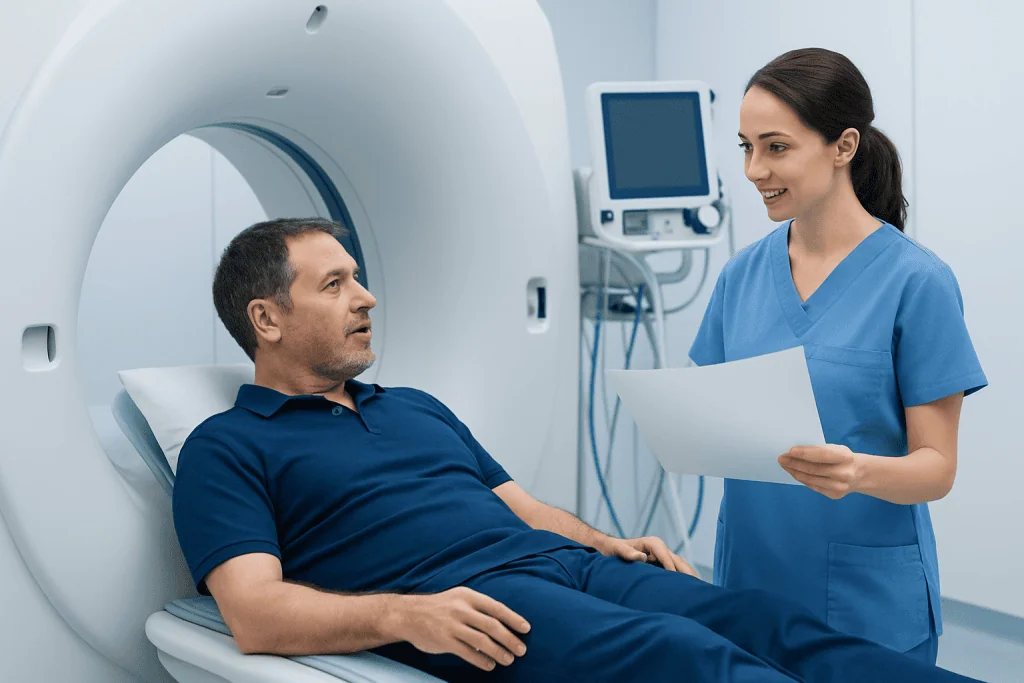
Be specific at the desk. Ask for two things: the original DICOM image set and the official written radiology report. If your scan covered more than one body area, involved contrast phases, or was done across separate appointments, say clearly that you need the complete set, every series, not a selection.
Then ask about delivery. Most Turkish hospitals can burn a CD or DVD; some offer USB transfer or a secure download link, depending on their systems and data protection rules. If you are flying soon, tell the staff your departure date so they can say what is realistic before you leave. Reports can take longer than image files because a radiologist must finalise them.
- Ask whether the disc or drive includes a basic DICOM viewer for doctors who do not have imaging software to hand.
- Check that your name, date of birth and scan date are correct on the label and in the file record: a spelling mismatch with your passport can cause confusion at home.
- Ask whether the written report is available in English, or whether a translated report can be arranged.
- If you had several studies, list each one: brain MRI, chest CT, PET-CT, abdominal ultrasound, and so on.
- If you may need further imaging before you fly, factor that into your request: our guide on extra tests after arriving in Turkey covers how additional studies are arranged.
Where to request DICOM files in Turkey

In most Turkish hospitals, imaging records are handled by the radiology department, the medical records office, the patient registration desk, or international patient services. If you are unsure where to start, the international patient office or the unit that arranged your scan can point you to the right desk and provide language support.
Expect an identity check. Hospitals release imaging under privacy and patient safety processes, which means staff will verify who you are before handing over files, even if you are in a hurry. This step protects your medical information and ensures records reach the correct person, so build a little time into your plans rather than treating collection as a two-minute errand.
If someone else is collecting on your behalf, a companion, family member or assistant, the hospital will usually want written authorisation from you plus identification from both of you. Requirements vary between institutions, so confirm what is needed early, not on the morning of your flight.
Documents and details to have ready
A short list of details saves a surprising amount of time. Bring your passport or national ID, your hospital registration number if you were given one, the date of the scan, and the name of the study. If you cannot recall the exact name, describe the body area and the department that referred you: the records team can find the study from there.
If you are requesting DICOM images after a scan in Turkey once you have already flown home, expect a more formal process: typically a signed request form, a copy of your ID, and your contact details, sent through an official records or international patient channel. Some hospitals accept email requests through these channels; others require extra verification. Avoid sending medical information through informal messaging apps unless the hospital specifically directs you to a secure process it controls.
For children or dependent adults, the hospital may need proof that you are the parent, legal guardian or authorised representative. If the patient is an adult who cannot request the files personally, ask the records office which consent documents they require before anyone travels to collect them.
How to check your DICOM files are usable
Before you walk away from the desk, ask whether the CD, USB or link can be checked on site. You are not interpreting anything: you are simply confirming three things: the media opens, the patient name and date of birth are yours, and the list of studies matches what you had done. A problem found at the desk takes minutes to fix; the same problem found at home takes weeks.
DICOM files often appear as folders full of technical file names rather than ordinary pictures. That is normal. Do not rename, move or “tidy” the files, because many viewers depend on the original folder structure to reassemble the study. If a viewer program is included on the disc, it is usually built for Windows; your doctor at home may prefer to import the raw DICOM folder into their own system instead, which works regardless of the bundled viewer.
If you receive a secure download link, ask three questions: how long does the link stay active, is a password or verification code needed, and can it be shared with a healthcare provider? Some links are tied to your identity and cannot simply be forwarded, so it is worth knowing the intended route before you rely on it.
Getting DICOM files off an MRI or CT disc
A common question after any scan, an MRI especially, because the studies are large, is how to get the DICOM files off the disc you were given. The DICOM data is already on the disc: it usually sits in a folder called something like DICOM, alongside an index file often named DICOMDIR and sometimes a viewer application. Nothing needs converting.
If your home clinic asks for the files digitally, you can copy the entire disc contents, the whole folder structure, exactly as it is, onto a USB drive or into the upload tool the clinic provides. Copy everything, not just the images you can see, because the index and metadata files matter. If your computer has no disc drive, an inexpensive external USB drive reader solves it, or your home clinic’s imaging department can import the disc directly.
What you should not do: export screenshots, convert images to JPEG for convenience, or send a phone photo of the screen. Those steps strip out the technical data that makes the study clinically useful.
Can you send DICOM images by email?
Usually not, and it is worth understanding why so you do not lose days trying. There are two problems. First, size: a single MRI or CT study can run into hundreds of megabytes or several gigabytes, far beyond ordinary email attachment limits. Second, security: standard email is generally not an approved channel for medical records, and many clinics will not accept imaging that arrives this way.
What works instead:
- Patient portals and imaging upload platforms. Many hospitals and clinics abroad have a dedicated route for importing outside imaging. Ask your receiving clinic first: they will tell you their preferred method.
- Secure links issued by the Turkish hospital. Where available, these are designed for exactly this purpose.
- Physical media. The CD or USB you carry home remains a completely valid way to hand over a study; the receiving radiology department imports it into their own system (PACS).
If a clinic does ask you to email something, it is normally the written report, a small PDF, not the DICOM study itself. Sending the report ahead by email while carrying the images physically is a common and sensible combination.
Sharing images with your doctor at home
Contact your home doctor or clinic before your appointment and ask how they want to receive outside imaging. Some will say “bring the disc”; others will send an upload link. Following their process is faster than improvising one.
Whenever possible, deliver the written radiology report together with the DICOM files. The report summarises the findings of the radiologist who reviewed the scan in Turkey; the images allow your home team to review the original study themselves if they need to. If your report is in Turkish, ask the receiving clinic whether they need an English version, many hospitals in Turkey can issue reports in English for international patients if you ask early.
Complete records reduce delays, repeated document requests, and in some cases repeated scans. What your home doctor does with the images is a medical decision for them; your job is simply to arrive with a complete, readable set.
Privacy, timing and travel tips
Imaging files are part of your medical record, so identity checks, consent forms and official release channels are not bureaucracy for its own sake: they are how your privacy is protected. Plan extra time after the scan, particularly if the written report is not finalised on the same day.
Practical points for the journey home:
- Carry discs and USB drives in your hand luggage, not checked baggage.
- Protect them from bending, scratching, heat and pressure. Do not fold a paper disc envelope.
- Photograph the disc label for your own reference, so you have the study details even if you are separated from the media.
- Store any link passwords or access codes separately from the media, but somewhere you will find them.
- If you have appointments in more than one department or city, tell your patient coordinator early that all imaging records need to be gathered before departure: that single sentence prevents a stressful last-minute hospital visit on travel day.
If your scans were part of a larger treatment plan, two related guides may help: how to organise scan reports and images when flying to Turkey, and when it is safe to fly after treatment in Turkey.
Step by step
- Say you need DICOM files early. Mention it before or immediately after your scan, especially if you fly home soon. Your coordinator can direct you to the right desk and arrange interpretation if needed.
- Request both images and report. Ask for the original DICOM image set and the official written radiology report. List each scan you had so nothing is missed.
- Show identification. Bring your passport or ID and any hospital registration number. If someone else is collecting for you, confirm the authorisation documents in advance.
- Choose the delivery method. CD, DVD, USB or a secure link, depending on the hospital’s systems. Ask whether a viewer is included and confirm the files are original DICOM, not exported pictures.
- Check before leaving. Confirm the disc, drive or link opens, the study list is complete, and your name, date of birth and scan date are correct.
- Protect the media in transit. Hand luggage only. Keep access codes separate but safe.
- Ask your home clinic how they want it. Portal, upload platform, or the disc in person, follow their process rather than emailing large files.
Your checklist
- Passport or official ID
- Hospital registration number, if available
- Date and type of each scan (note the Turkish name if that is what your paperwork shows)
- Name of the referring doctor or department
- Request for the original DICOM images: the complete set
- Request for the written radiology report, in English if available
- Authorisation letter if collecting for someone else
- Secure place in hand luggage for the CD, DVD or USB
- Your home clinic’s preferred method for receiving imaging
Key takeaways
- DICOM files are the original medical images with their full technical data, not screenshots, films or PDFs.
- Request both the DICOM images and the written radiology report before leaving the hospital.
- On Turkish paperwork, a CT is “BT” (bilgisayarlı tomografi) and an MRI is “MR”, knowing the terms helps you check your disc is complete.
- Ordinary email is usually unsuitable for DICOM studies; use portals, secure links or physical media instead.
- Check the disc, USB or link while still on site, keep it in hand luggage, and ask your home clinic how they prefer to receive it.
Frequently asked questions
How do I get DICOM images after a scan in Turkey?
Ask the radiology department, medical records office or international patient desk at the hospital where you were scanned. Request the original DICOM image set and the written radiology report, show your passport or ID, and choose a delivery format, usually CD, DVD, USB or a secure link. Requesting before you leave the hospital is the fastest route.
What is a CT scan called in Turkish?
A CT scan is called “bilgisayarlı tomografi” in Turkish, abbreviated as “BT” on paperwork and disc labels. So “Toraks BT” means a chest CT. An MRI appears as “MR” (manyetik rezonans), ultrasound as “ultrason” or “USG”, and a plain X-ray as “röntgen”.
How do I send DICOM images by email?
In most cases you cannot: full DICOM studies are too large for standard email attachment limits, and email is generally not secure enough for medical records. Use your home clinic’s patient portal or upload platform, a secure link issued by the Turkish hospital, or hand over the physical disc or USB. The written report, as a small PDF, can often be emailed separately if the clinic accepts it.
How do I get DICOM files off an MRI CD?
The DICOM data is already on the disc, usually in a folder named DICOM with an index file called DICOMDIR. Copy the entire disc contents, the complete folder structure, unchanged, to a USB drive or into your clinic’s upload tool. Do not rename files or convert images to JPEG, as that strips clinically important data.
Can I get DICOM images on the same day as my scan in Turkey?
Often the image files can be prepared shortly after the scan, but timing depends on the hospital’s workflow and the type of study. The written report may take longer because a radiologist must finalise it. If you have a flight or transfer planned, tell the staff your departure date as early as possible.
Is the radiology report enough, or do I really need the DICOM files?
The report matters because it summarises the radiologist’s findings, but your doctor at home may also need the original images to review details, take measurements, compare with other scans or plan treatment. For international follow-up, request both: the report alone often cannot replace the images.
What if I already left Turkey without my DICOM images?
Contact the medical records or international patient office at the hospital where the scan was performed, through its official channels. You will likely need to complete a signed request form and provide a copy of your ID for privacy verification. Processing and delivery options vary between hospitals, so allow extra time rather than waiting until just before your next appointment.
Can I request DICOM images for a family member?
Usually yes, but the hospital will typically require written authorisation from the patient plus identification from both of you. For children, parental or guardianship documents may be requested; for adults who cannot request records themselves, ask the records office which consent documents apply. Confirm requirements in advance so collection is not delayed.
Add us as a Preferred Source to see more of our trusted health content across Google Search, AI Overviews and Discover.

Update history
- PublishedJune 16, 2026
- Medical review approvedSeptember 13, 2026
- Last content updateSeptember 12, 2026
References2
- CT Scans: MedlinePlus medlineplus.gov
- MRI Scan: NHS nhs.uk
More Patient Guides
Sleep Apnea Testing in Turkey: What Happens During Your Evaluation
Sleep apnea testing in Turkey may include a consultation, overnight sleep study or home test, and a clear review of your results…

How to Organize Your Test Results Before Traveling to Turkey
Organize your test results before traveling to Turkey by sorting records, images, medicines and timelines so your Istanbul care team can review…

When Extra Tests Are Needed Before Treatment in Turkey
Extra tests before treatment in Turkey may be needed to confirm diagnosis, timing, and safety. Here is what you can expect in…

At Acibadem, How to Prepare for Blood Tests, Scans, and Pre-Op Checks
Blood tests, scans, and pre-op checks at Acibadem in Turkey help confirm you are ready for treatment and avoid delays on the…